
Imagine opening a beautiful store in the middle of a desert. The store shelves are fully stocked, the branding also looks fantastic, and everything is perfectly organized in the store but there’s one problem that no customer walked through the door.
This is the scenario we observe with thousands of small business websites every year.
Business owners invest more time and money in designing a website, buying a domain, writing content and launching it with high expectations of great results. They believe that the website will start bringing in enquiries and sales automatically.
A few months later, reality hits.
Traffic is low, enquiries are rare, and sales also low.
The website is not problem it is doing the job it was meant to do.
The truth is that having a good website is simply not enough for results. In today’s competitive online world, your website needs to do much more than simply looking professional. It must attract the right audience, build trust within seconds looking at website, answer visitors’ questions and guide them toward taking action for enquires.
Quick Answer
Many small business websites fail by focuing on appearance of website instead of business results. SO they should focus on main issues like poor SEO, unclear messaging, slow loading speed, confusing navigation, weak calls-to-action and a lack of trust as they donot contain testimonials make it difficult for visitors to take next step. By fixing all these issues small business can improve conversions rate and increase sales automatically.
Table of Contents
- Why Most Business Websites Fail
- The Biggest Website Mistakes
- Why Traffic Alone Doesn’t Create Sales
- Understanding Customer Intent
- Building Trust That Converts
- Website Speed and Mobile Experience
- SEO That Brings Qualified Visitors
- Creating High-Converting Landing Pages
- Essential Features Every Business Website Needs
- Website Audit Checklist
- Recommended Tools
- Frequently Asked Questions
- Key Takeaways
- Conclusion

Why Most Business Websites Fail
Many business owners believe launching a website automatically leads to customers. But, the truth is that, websites don’t generate revenue and simply they exist.
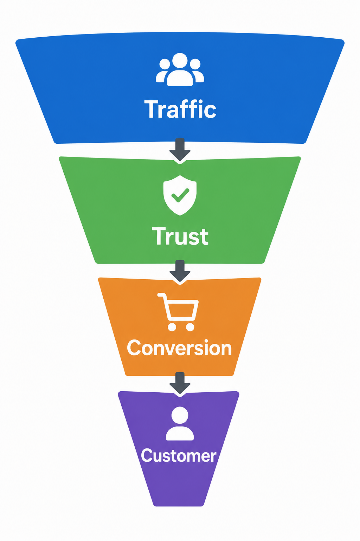
Instead, every successful website follows one simple process:
Traffic → Trust → Action → Customer
If any one of these stages breaks, sales will be effected.
For example:
- Visitors cannot find your website.
- Visitors don’t trust your business.
- Visitors become confused.
- Visitors leave without contacting you.
That’s why many attractive websites still fail.
Expert Insight: A website always should function like your best salesperson educating visitors about products and services of business, addressing customer concerns, building confidence and encouraging action.
The Biggest Website Mistakes
1. No Clear Value Proposition
Visitors when visited your website they decide within a seconds whether your business is relevant to them or not.
Compare these two headlines:
❌ We Deliver Innovative Digital Solutions.
✅ Get More Qualified Lead generation with SEO & High-Converting Websites.
The second headline tells visitors exactly they want.
Example
Shopify’s homepage will not just explain company history. Instead, it immediately explains the benefit:
“The platform commerce is built on.”
It simply guide users toward starting a free trial and making the next step easily for customers.
Expert Tip: The first screen of your homepage should describe about your business like what you do, who you assist, and why they should pick you.
2. Slow Website Speed
People expect pages to load within seconds they open. If it take long time they will simply leave the website.
Common causes include:
- Large images
- Too many plugins
- Cheap hosting
- Unoptimized code
Quick Win
By compress images, enable caching, and using a reliable hosting service loading speed can be improved.
Google reports says that 53% of mobile users will leave a page if it takes more than three seconds to load the page.
Source: https://support.google.com/adsense/answer/7450973?hl=en
3. Poor Mobile Experience
More than half of global website traffic is coming from only mobile devices.
Google also uses mobile-first indexing, it primarily looks at the mobile version of your business website to decide search ranking.
If visitors struggle to navigate your website on a smartphone then they’ll leave your website and your rankings will be effected.
Check:
- Font size
- Button spacing
- Contact forms
- Navigation
- Loading speed
4. Weak Calls-to-Action
Many websites expect visitors to know what to do.
Instead, guide them clearly.
Examples:
- Get a Free Quote
- Book a Consultation
- Call Now
- Download the Guide
- Request Pricing
Avoid generic buttons like “Submit.”
5. No Trust Signals
People mostly buy from businesses they trust.
Add:
- Customer reviews
- Testimonials
- Google ratings
- Certifications
- Awards
- Portfolio
- Before-and-after images
- Client logos
Common Mistake
Many businesses keep testimonials on separate pages instead of displaying them throughout the website, so that they lack trust from customers.

Why Traffic Alone Doesn’t Create Sales
Many owners celebrate increasing website traffic.
But traffic means nothing without qualified visitors.
Consider this:
| Website A | Website B |
| 20,000 visitors | 2,000 visitors |
| 0.5% conversion | 8% conversion |
| 100 leads | 160 leads |
Higher-quality traffic of a website will always produces better results for a business.
This is the reason why successful businesses focus less on vanity metrics like page views of website and focus more on attracting visitors who are actively searching for their products or services.
Understanding Customer Intent
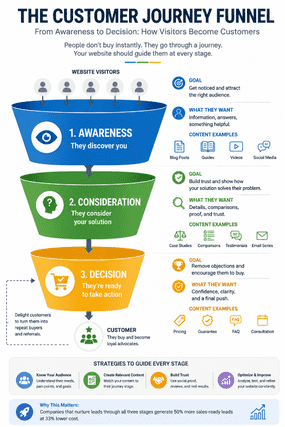
Every visitor has a goal.
Some want information.
Others compare options.
Some are ready to buy immediately.
Your website should serve each stage.
| Customer Stage | Website Content |
| Awareness | Educational blogs |
| Research | Comparison pages |
| Decision | Pricing & testimonials |
| Purchase | Contact forms & CTAs |
Pro Tip: Create dedicated pages for each stage instead of sending everyone to your homepage.
Building Trust That Converts
Your website don’t need flashy animations or expensive redesigns.
Instead of that focus on small improvements in your website which will bring the biggest impact.
Include:
- Professional design
- Real team photos
- Contact information
- Business address
- Secure HTTPS
- Transparent pricing (when possible)
- Frequently Asked Questions
- Privacy Policy
- Clear guarantees

Mini Case Study
A local home services company replaced stock photos with real project images, added verified customer testimonials, and simplified its contact form. Within a few months, enquiries increased noticeably because visitors felt more confident about reaching out.
You’re Not Measuring Performance
Many small businesses don’t monitor visitor behavior on their website.
That’s like opening up a store without knowing how many customers walked in or what they purchased exactly.
Track important metrics like:
- Bounce Rate
- Conversion Rate
- Contact Form Submissions
- Most Visited Pages
- Average Session Duration
According to HubSpot’s analysis report done on more than 1 million websites, it stated that the average website performance score was only 60.9 out of 100, highlighting that many businesses still should focus on improving areas like speed, SEO, and user experience of website.
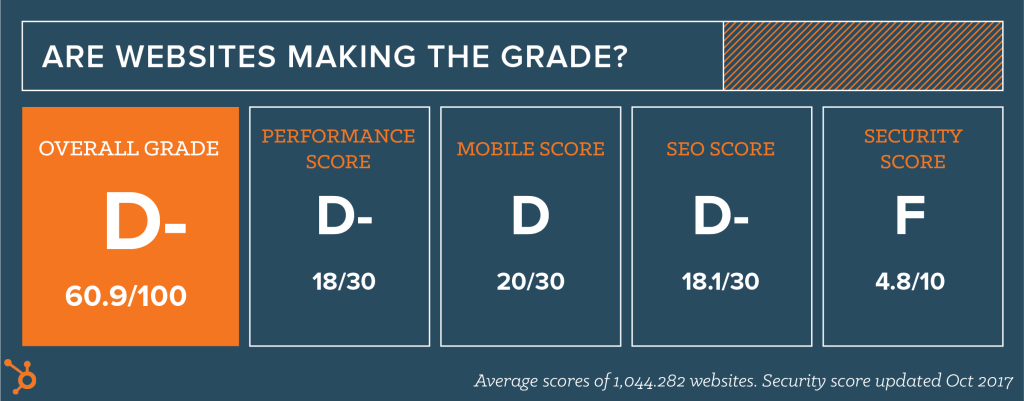
Source:
https://blog.hubspot.com/marketing/does-your-website-make-the-grade
Website Speed and Mobile Experience
Google and users both value fast websites.
Improve performance by:
- Compressing images.
- Minifying CSS and JavaScript.
- Using browser caching.
- Choosing quality hosting.
- Implementing lazy loading.
- Reducing unnecessary plugins.
- Optimizing fonts.
Remember
Every second saved can improve user satisfaction and conversion potential.
SEO That Brings Qualified Visitors
SEO is not about ranking for all keywords.
It’s about ranking for the keywords your ideal customers are actually searching for.
Focus on:
- Service pages
- Local SEO
- Helpful blog content
- Internal linking
- Structured headings
- Image optimization
- Meta descriptions
- Schema markup
Common Mistakes
Many business websites are publishing dozens of low-quality blog posts instead of a few comprehensive resources.
Creating High-Converting Landing Pages
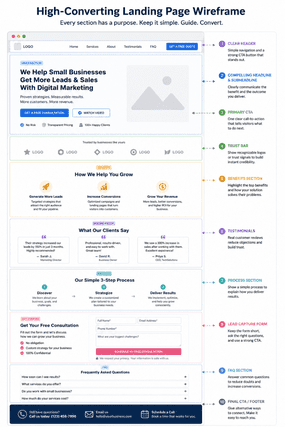
Great landing pages includes:
- Strong headline
- Clear benefits
- Customer testimonials
- Social proof
- Frequently Asked Questions
- One clear CTA
- Simple contact form
- Trust badges
Avoid multiple competing calls-to-action on one page.
Essential Features Every Business Website Needs
| Features | Why It Matters |
| Clear headline | Explains your value instantly |
| Fast loading | Reduces bounce rate |
| Mobile responsive | Improves user experience |
| Testimonials | Builds credibility |
| Contact form | Generates leads |
| Live chat | Answers questions quickly |
| Blog | Supports SEO |
| FAQ | Reduces objections |
| Strong CTA | Encourages action |
| Analytics | Measures performance |

Website Audit Checklist
Use this below checklist to evaluate your site:
SEO
- Keyword-optimized titles
- Meta descriptions
- Internal links
- Image alt text
- XML sitemap
User Experience
- Mobile friendly
- Fast loading
- Easy navigation
- Clear CTAs
- Accessible design
Trust
- Testimonials
- Reviews
- Contact information
- HTTPS
- Business details
Conversion
- Lead forms
- Call buttons
- Service pages
- Thank-you pages
- Conversion tracking
Pro Tips
- Place your CTA above the fold on all key page.
- Try to use real customer photos instead of generic stock photos.
- Answer common objections before visitors ask them.
- Keep forms as short as possible.
- Review analytics regularly to identify pages with high exit rates.
Tools & Resources
| Tool | Best For |
| Google Analytics | Visitor insights |
| Google Search Console | SEO performance |
| PageSpeed Insights | Speed testing |
| GTmetrix | Performance analysis |
| Hotjar | User behavior |
| Microsoft Clarity | Heatmaps & session recordings |
| Screaming Frog SEO Spider | Technical SEO audits |
| WordPress SEO plugins | On-page optimization |
Frequently Asked Questions
1. Why my website do not generate leads?
Because the website may contain issues like poor SEO, weak messaging, poor calls to action, slow performance, and lack of trust signals.
2. How long duration does SEO take?
Many business reach with in three to six months, but it depends on the level of competition and the quality of your website.
3. Is website design enough?
No. Great design just builds trust, so you should focus on other aspects also like quality content, smart SEO, an excellent user experience, and effective conversion optimization to turn visitors into paying customers.
4. Should every business should have a blog in their website?
A valuable blog helps the right customers find your business, builds trust, and establishes your expertise and give results.
5. What is website conversion rate?
Conversion rate depends on your industry and it varies, but improving your conversion rate is often better than just getting more visitors.
6. Why is mobile optimization important for a website?
Many people mainly use their phones to browse information. A mobile-friendly website keeps visitors engaged and reduces lost leads for business.
7. How often should I update my website?
Review your website regularly and keep your content, services, pricing, and SEO up to date to
compete with others.
8. What’s the first improvement I should make in website?
Always make your message clear for vistors, add a strong call-to-action, and ensure your website loads fast on mobile for better results.
Key Takeaways
- Your website should solve customer problems not just look attractive.
- Quality traffic is better than just more traffic.
- Trust signals is important in converting visitors into customers.
- Fast and mobile-friendly websites improve user experience and business outcomes.
- SEO and conversion optimization work best when combined together.
- Regular testing and updated keep your website to stay relevant and competitive.
Conclusion
A website is one of the most valuable digital assets for small business can own unless if it actively supports business goals. Successful website is not determined by having attractive visuals alone. It comes only when website is combining strong messaging, user-friendly design, technical performance, including trust-building elements and having a clear path for visitors to become customers.
Instead of asking, “Does my website look good?” ask, “Does my website help visitors to take the next step?” So small business should have some improvements in areas like speed, content, SEO, and conversion optimization which can lead to significant long-term growth for the business. You should start with the basics, measure your results, and keep updating your website based on real user behaviour for better results.