Category: Uncategorized
-
Digital Eye Strain : symptoms,causes & treatment
Do your eyes feel tired after working on a computer or scrolling on your phone for hours? You may be experiencing digital eye strain, one of the most common eye problems in today’s digital world.
Whether you’re a student, office worker, gamer, or professional, prolonged screen use can lead to tired eyes, blurred vision, headaches, and dry eyes. The good news is that most cases can be prevented with simple changes to your daily habits.
In this guide, you’ll learn what digital eye strain is, its symptoms, causes, treatment options, and practical tips to protect your eyes
What is Digital Eye Stain ?
Digital Eye Strain is eye discomfort caused by spending too much time looking at digital screens without enough breaks.
Common Symptoms:
- Eye fatigue
- Dry or watery eyes
- Blurred vision
- Headaches
- Burning or itchy eyes
- Neck and shoulder pain
What Does Digital Eye Strain Feel Like?
Digital eye strain can cause a range of symptoms that usually develop after spending long hours using computers, smartphones, tablets, or other digital devices. The discomfort is often temporary and improves after taking a break, but frequent symptoms may indicate that your eyes need attention.
Common Symptoms of Digital Eye Strain
The most common symptoms include:
- Eye fatigue or tired eyes
- Dry, irritated, or watery eyes
- Blurred vision
- Headaches, especially around the forehead or temples
- Burning or itchy eyes
- Difficulty focusing after screen use
- Increased sensitivity to light
- Neck, shoulder, or upper back pain caused by poor posture
Many people experience more than one of these symptoms at the same time, especially after several hours of uninterrupted screen use.
Symptoms in Adults
Adults who work on computers for long hours often experience:
- Tired or heavy eyes at the end of the day
- Frequent headaches
- Dry eyes from reduced blinking
- Blurred vision when looking away from the screen
- Neck and shoulder discomfort due to improper workstation setup
These symptoms are common among office workers, programmers, graphic designers, and people who frequently use digital devices.
Symptoms in Children
Children may not always tell you that their eyes are tired, but you may notice signs such as:
- Frequent eye rubbing
- Squinting while looking at screens
- Holding devices very close to their face
- Complaining of headaches
- Difficulty concentrating after screen time
- Excessive blinking or watery eyes
If these symptoms occur regularly, it’s a good idea to reduce screen time and schedule a comprehensive eye examination.
Quick Tip
If your symptoms improve after taking a short break from screens, they are likely related to digital eye strain. However, if the discomfort continues even after resting, consult an optometrist to rule out underlying vision problems.
What Causes Digital Eye Strain?
Digital eye strain is mainly caused by prolonged use of digital devices such as computers, smartphones, tablets, and laptops. When you focus on a screen for long periods, your eyes have to work harder, leading to fatigue and discomfort.
Here are the most common causes of digital eye strain:
Reduced Blinking
People blink about 15–20 times per minute under normal conditions. While using digital screens, the blink rate can drop by nearly 50%, causing tears to evaporate faster. This often leads to dry, irritated, and tired eyes.
Long Screen Time
Looking at a screen continuously for hours forces your eye muscles to stay focused at a close distance. Over time, this can lead to eye fatigue, blurred vision, and headaches.
Screen Glare and Reflections
Glare from windows, bright lights, or glossy screens makes your eyes work harder to see clearly. Excessive glare can increase eye strain and reduce visual comfort.
Poor Lighting
Using digital devices in lighting that is too bright or too dim creates unnecessary stress on your eyes. Proper room lighting helps reduce strain and improves viewing comfort.
Incorrect Screen Distance and Position
Holding a phone too close or placing a computer monitor too high or too low can make your eyes and neck work harder. Ideally, the screen should be 50–70 cm (20–28 inches) away and slightly below eye level.
Uncorrected Vision Problems
If you have an outdated glasses prescription or an undiagnosed vision problem such as nearsightedness, farsightedness, or astigmatism, your eyes must work harder to focus on digital screens, increasing eye strain.
Poor Posture
Slouching while using a computer or mobile device can cause neck, shoulder, and back pain that often accompanies digital eye strain. Maintaining good posture helps reduce both eye and muscle fatigue.
Small Text and Poor Screen Settings
Reading tiny text, low-contrast content, or using a screen with incorrect brightness and contrast forces your eyes to work harder. Adjusting font size and display settings can make screen viewing much more comfortable.
Blue Light Exposure
Digital screens emit blue light, but current scientific evidence suggests that blue light is not the primary cause of digital eye strain. The main problem is prolonged screen use and reduced blinking. However, using screens late at night may interfere with sleep by affecting your body’s natural sleep-wake cycle.
Key Takeaway
Digital eye strain is usually caused by a combination of long screen time, reduced blinking, poor lighting, glare, improper viewing distance, incorrect vision correction, and poor posture. Addressing these factors can significantly reduce eye discomfort.
Who Is Most at Risk of Digital Eye Strain?
Anyone who spends long hours looking at digital screens can develop digital eye strain. However, some people are more likely to experience symptoms because of their work, study habits, or existing eye conditions.
Office Workers
People who spend most of their workday on computers are at a higher risk. Long hours of screen use, fewer breaks, and continuous focus can lead to tired eyes, headaches, and blurred vision.
Students
Students often use laptops, tablets, and smartphones for online classes, homework, and entertainment. Extended screen time without regular breaks increases the risk of digital eye strain.
Gamers
Gamers may spend several hours looking at fast-moving visuals while blinking less frequently. This can cause dry eyes, eye fatigue, and difficulty focusing after gaming sessions.
Graphic Designers and Video Editors
Professionals who work with detailed images, colors, and fine visual elements require intense visual concentration. Their eyes work harder for extended periods, increasing the risk of eye strain.
Programmers and IT Professionals
Software developers and IT professionals often stare at lines of text on computer screens for many hours. Continuous near-focus and prolonged screen exposure can lead to digital eye strain.
Contact Lens Wearers
Contact lens users may experience dryness more easily because screen use reduces blinking. This can make the eyes feel irritated, uncomfortable, or gritty during prolonged device use.
People with Uncorrected Vision Problems
Individuals with an outdated glasses prescription or untreated vision conditions such as nearsightedness, farsightedness, or astigmatism may have to strain their eyes more when using digital devices.
Older Adults
As we age, our eyes naturally produce fewer tears and may have difficulty focusing on near objects. This makes older adults more susceptible to dry eyes and digital eye strain.
People Who Use Multiple Screens
Switching frequently between computers, smartphones, tablets, and televisions increases the amount of time your eyes spend focusing on digital displays, raising the risk of eye strain.
Key Takeaway
While digital eye strain can affect anyone, it is most common among office workers, students, gamers, programmers, graphic designers, contact lens wearers, older adults, and people who spend several hours each day using digital devices. Taking regular breaks and following healthy screen habits can significantly reduce the risk.
Can Digital Eye Strain Damage Your Eyes?
The short answer is no. Digital eye strain does not cause permanent damage to your eyes or vision. However, spending long hours looking at digital screens can lead to temporary discomfort and affect your daily productivity.
The symptoms usually improve after taking a break, getting enough rest, or making simple changes to your screen habits. If symptoms continue despite these measures, it’s important to have your eyes examined by an optometrist.
Can It Make Existing Eye Problems Worse?
Yes. Digital eye strain can make existing eye conditions more noticeable, including:
- Dry eye disease
- Uncorrected refractive errors (nearsightedness, farsightedness, or astigmatism)
- Eye muscle fatigue
- Difficulty focusing at near distances
Treating these underlying conditions often reduces symptoms.
When Should You Be Concerned?
Digital eye strain symptoms should improve after resting your eyes. If you experience any of the following, schedule a comprehensive eye examination:
- Blurred vision that doesn’t improve after a break
- Persistent eye pain
- Double vision
- Frequent or severe headaches
- Red eyes that do not improve
- Sudden changes in vision
Key Takeaway
Digital eye strain does not permanently damage your eyes or cause blindness. However, it can cause temporary discomfort, reduce productivity, and make existing eye problems more noticeable. Healthy screen habits, regular breaks, and routine eye examinations are the best ways to protect your vision.
How Is Digital Eye Strain Diagnosed?
here is no single test that diagnoses digital eye strain. Instead, an optometrist diagnoses the condition by reviewing your symptoms, screen use habits, and performing a comprehensive eye examination to rule out other eye problems.
Medical History and Symptoms
Your optometrist will ask questions about:
- How many hours you spend using digital devices each day
- When your symptoms begin and how long they last
- Whether the symptoms improve after taking a break
- Your work or study environment
- Any previous eye conditions or surgeries
- Whether you wear glasses or contact lenses
These details help determine whether your symptoms are related to prolonged screen use.
Vision Assessment
Your vision will be tested to check whether you have:
- Nearsightedness (myopia)
- Farsightedness (hyperopia)
- Astigmatism
- Presbyopia (age-related difficulty focusing on near objects)
Even a small, uncorrected prescription can contribute to digital eye strain.
Eye Focusing and Eye Movement Tests
The optometrist may assess how well your eyes:
- Focus on near objects
- Work together as a team (binocular vision)
- Move smoothly while reading or looking at a screen
- Shift focus between near and distant objects
Problems with focusing or eye coordination can increase symptoms during prolonged screen use.
Tear Film and Dry Eye Evaluation
Because reduced blinking is common during screen use, your optometrist may check for signs of dry eye by evaluating:
- Tear production
- Tear film stability
- The surface of your eyes
Dry eye disease is a common contributor to digital eye strain.
Eye Health Examination
A comprehensive eye examination helps rule out other conditions that may cause similar symptoms, such as:
- Dry eye disease
- Allergies
- Eye infections
- Glaucoma
- Cataracts
- Other vision disorders
This ensures that your symptoms are not caused by an underlying eye condition.
When Should You Get an Eye Exam?
You should schedule an eye examination if:
- Your symptoms persist despite taking regular screen breaks
- Blurred vision does not improve after resting
- You have frequent headaches during screen use
- Your eyes remain dry, red, or painful
- You have not had an eye examination in the past one to two years
Key Takeaway
Digital eye strain is diagnosed through a comprehensive eye examination, along with a review of your symptoms and screen habits. An optometrist evaluates your vision, focusing ability, eye coordination, tear film, and overall eye health to identify the cause of your discomfort and recommend the most appropriate treatment.
How to Treat Digital Eye Strain
Digital eye strain is usually temporary and can often be treated with simple lifestyle changes, proper eye care, and good screen habits. The goal is to reduce eye fatigue, improve comfort, and prevent symptoms from returning.
Follow the 20-20-20 Rule
One of the most effective ways to reduce eye strain is the 20-20-20 rule:
- Every 20 minutes
- Look at something 20 feet away
- For at least 20 seconds
This helps relax the eye muscles and reduces fatigue.
Blink More Often
People blink less while using digital screens, which can lead to dry eyes. Make a conscious effort to blink fully and frequently to keep your eyes naturally lubricated.
Use Artificial Tears
If your eyes feel dry or irritated, preservative-free artificial tears can provide temporary relief. Your optometrist can recommend the most suitable eye drops based on your symptoms.
Adjust Your Screen Setup
A comfortable workstation can significantly reduce eye strain.
- Keep the screen 50–70 cm (20–28 inches) away.
- Position the monitor slightly below eye level.
- Increase text size for easier reading.
- Adjust brightness and contrast to match the room lighting.
Reduce Screen Glare
Glare from windows or overhead lighting can make your eyes work harder.
To reduce glare:
- Use curtains or blinds if needed.
- Position the screen away from direct light.
- Consider an anti-glare screen filter if reflections are unavoidable.
Wear the Correct Prescription Glasses
An outdated or incorrect glasses prescription can make your eyes work harder. If you wear glasses, regular eye examinations ensure your prescription is up to date. Some people may also benefit from computer-specific glasses recommended by their optometrist.
Improve Your Work Environment
Simple ergonomic changes can reduce both eye strain and muscle discomfort.
- Sit with good posture.
- Keep your feet flat on the floor.
- Ensure your chair and desk are at a comfortable height.
- Take short breaks throughout the day to stretch your neck and shoulders.
Limit Continuous Screen Time
Whenever possible, avoid using digital devices for long periods without breaks. Short, regular breaks are more effective than one long break at the end of the day.
Get Regular Eye Examinations
Routine eye exams help detect vision problems that may contribute to digital eye strain. Your optometrist can recommend personalized treatment based on your visual needs and daily screen use.
Key Takeaway
Most cases of digital eye strain improve with regular screen breaks, frequent blinking, proper workstation setup, good lighting, and updated vision correction. If symptoms continue despite these measures, consult an optometrist for a comprehensive eye examination to identify any underlying eye conditions.
Common Myths About Digital Eye Strain
There are many misconceptions about digital eye strain. Understanding the facts can help you protect your eyes and avoid unnecessary worry.
Myth 1: Digital Eye Strain Causes Permanent Eye Damage
Fact: Digital eye strain does not permanently damage your eyes or cause blindness. It causes temporary symptoms such as tired eyes, dryness, blurred vision, and headaches, which usually improve after resting your eyes.
Myth 2: Blue Light Is the Main Cause of Digital Eye Strain
Fact: The main causes of digital eye strain are prolonged screen use, reduced blinking, glare, and poor viewing habits. While blue light from screens can affect your sleep if you use devices before bedtime, current research does not show that it is the primary cause of digital eye strain.
Myth 3: Only Adults Get Digital Eye Strain
Fact: Children, teenagers, and adults can all develop digital eye strain if they spend long periods using computers, tablets, smartphones, or gaming devices.
Myth 4: Wearing Blue Light Glasses Solves the Problem
Fact: Blue light glasses may help some people with comfort, but they are not a cure for digital eye strain. Healthy habits like taking regular breaks, blinking often, and maintaining proper screen distance are more effective.
Myth 5: If Your Eyes Don’t Hurt, You’re Fine
Fact: Not everyone experiences eye pain. Digital eye strain can also cause headaches, dry eyes, blurred vision, difficulty focusing, and neck or shoulder pain.
Myth 6: Young People Don’t Need Eye Exams
Fact: Even if your vision seems normal, regular eye examinations can detect uncorrected vision problems that may contribute to digital eye strain.
Myth 7: More Screen Time Always Means Permanent Vision Loss
Fact: Long hours of screen use can increase discomfort, but there is no evidence that it permanently damages healthy eyes. Following healthy screen habits can greatly reduce symptoms.
Key Takeaway
Digital eye strain is temporary and manageable. The best way to protect your eyes is to rely on evidence-based advice rather than common myths. Taking regular breaks, blinking often, maintaining proper screen ergonomics, and having routine eye examinations are the most effective ways to reduce eye strain
When Should You Visit an Optometrist or Ophthalmologist?
Digital eye strain is usually temporary and improves with better screen habits. However, if your symptoms persist or become more severe, it’s important to seek professional eye care. Early evaluation can identify underlying eye conditions and help prevent ongoing discomfort.
Visit an Optometrist If:
An optometrist can diagnose and manage most cases of digital eye strain. Schedule an eye examination if you experience:
- Eye strain that lasts for several days
- Frequent headaches after screen use
- Blurred vision that doesn’t improve after taking breaks
- Dry, burning, or watery eyes
- Difficulty focusing while reading or using digital devices
- An outdated glasses or contact lens prescription
- It’s been 1–2 years since your last comprehensive eye exam
An optometrist will assess your vision, eye coordination, tear film, and overall eye health. They can prescribe glasses, recommend artificial tears, and suggest personalized strategies to reduce digital eye strain.
Visit an Ophthalmologist If:
An ophthalmologist is a medical doctor who specializes in diagnosing and treating eye diseases and performing eye surgery. You should seek immediate medical attention if you experience:
- Sudden vision loss
- Severe or persistent eye pain
- Double vision
- Flashes of light or a sudden increase in floaters
- Eye injury or chemical exposure
- Red, swollen eyes with pain or discharge
- Sudden loss of part of your visual field
These symptoms are not typical of digital eye strain and may indicate a more serious eye condition that requires prompt medical evaluation.
Optometrist vs. Ophthalmologist: What’s the Difference?
Optometrist Ophthalmologist Performs comprehensive eye exams Medical doctor specializing in eye diseases Prescribes glasses and contact lenses Diagnoses and treats complex eye conditions Treats digital eye strain and dry eyes Performs eye surgery when needed Provides preventive eye care Manages serious eye diseases and emergencies Key Takeaway
Most people with digital eye strain should visit an optometrist for a comprehensive eye examination. However, if you experience sudden vision changes, severe eye pain, eye injuries, or other serious symptoms, seek immediate care from an ophthalmologist. Prompt evaluation helps ensure the right diagnosis and treatment while protecting your long-term eye health.
Key Takeaways
- Digital eye strain is a common condition caused by prolonged use of digital devices such as computers, smartphones, tablets, and laptops.
- The most common symptoms include eye fatigue, dry eyes, blurred vision, headaches, burning eyes, and neck or shoulder pain.
- The main causes are long screen time, reduced blinking, glare, poor lighting, incorrect screen distance, and uncorrected vision problems.
- Office workers, students, gamers, programmers, and anyone who spends several hours a day on digital devices are at a higher risk.
- Digital eye strain does not permanently damage your eyes, but it can reduce comfort, productivity, and quality of life if left unmanaged.
- Most cases can be managed by following the 20-20-20 rule, blinking more often, reducing glare, maintaining proper posture, and taking regular screen breaks.
- Routine eye examinations help detect vision problems that may contribute to digital eye strain and ensure your prescription is up to date.
- Visit an optometrist if symptoms persist despite self-care. Seek immediate care from an ophthalmologist if you experience sudden vision loss, severe eye pain, double vision, or an eye injury.
- Healthy screen habits and regular eye check-ups are the best ways to prevent digital eye strain and maintain long-term eye comfort.
Final Thought
Digital devices are an essential part of modern life, but they shouldn’t come at the expense of your eye health. By practicing healthy screen habits, taking regular breaks, and scheduling routine eye examinations, you can significantly reduce the risk of digital eye strain and keep your eyes comfortable, healthy, and productive every day.
Conclusion
Digital eye strain has become increasingly common as we spend more time using computers, smartphones, tablets, and other digital devices. While it does not cause permanent eye damage, it can lead to symptoms such as eye fatigue, dry eyes, blurred vision, headaches, and neck or shoulder pain that affect your daily comfort and productivity.
The good news is that digital eye strain is largely preventable. Following simple habits like the 20-20-20 rule, blinking regularly, maintaining the correct screen distance, reducing glare, and taking frequent breaks can significantly reduce eye discomfort. Regular comprehensive eye examinations also help identify vision problems that may worsen digital eye strain.
If your symptoms persist despite making these changes, or if you experience sudden vision changes, severe eye pain, or other unusual symptoms, seek professional advice from an optometrist or ophthalmologist.
By adopting healthy screen habits today, you can protect your vision, improve your comfort, and continue using digital devices safely for work, study, and entertainment.
-
Why Some Websites Load in 2 Seconds While Others Take 10Here’s the Real Reason
The beginner-friendly guide to Content Delivery Networks (CDNs) that every website owner should read.
By the End of This Article, You’ll Know:
- What a CDN is
- How a CDN works
- Why Google prefers fast websites
- CDN vs. Web Hosting
- How to choose the right CDN
Introduction
Imagine you are walking into a supermarket.

Would you rather get groceries from a store which is 2 minutes away or drive to a store which is 40 minutes away from your city ?
Definitely, you’d choose the nearby store.
Similarly your website visitors think exactly the same way.
When someone visits your website, every image, logo, button, and page has to travel from your server to their device. If that server is thousands of kilometers away, the website feels painfully slow.
That’s where exactly a Content Delivery Network (CDN) changes everything.
Instead of serving your website from one location, it delivers your content from the closest server to every visitor around the worlWebsite Speed Matters
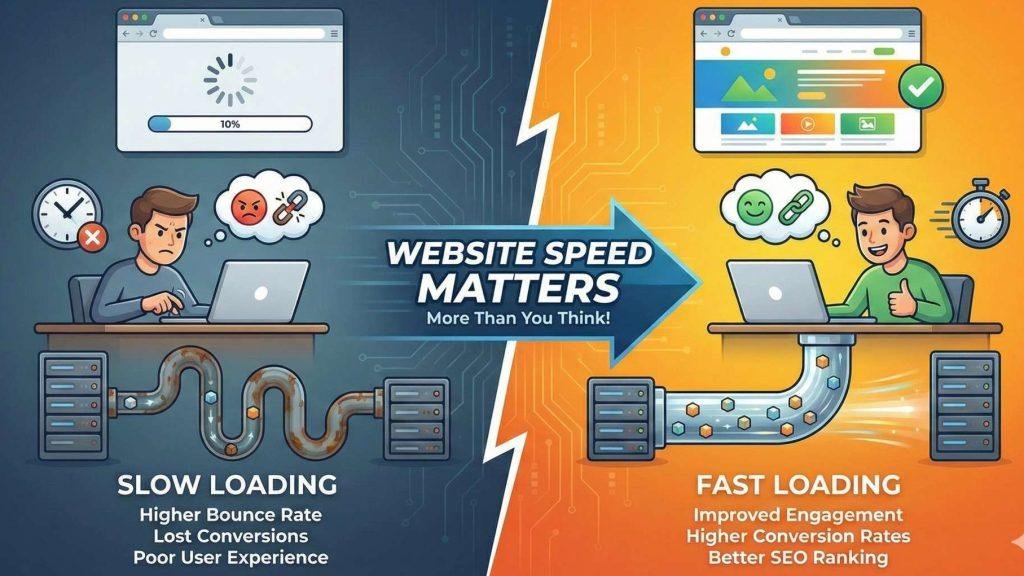
Does really Website Speed Matters?
You will be surprised to know this fact.. even a 1-second delay enormously can reduce conversions and increase visitor drop-offs
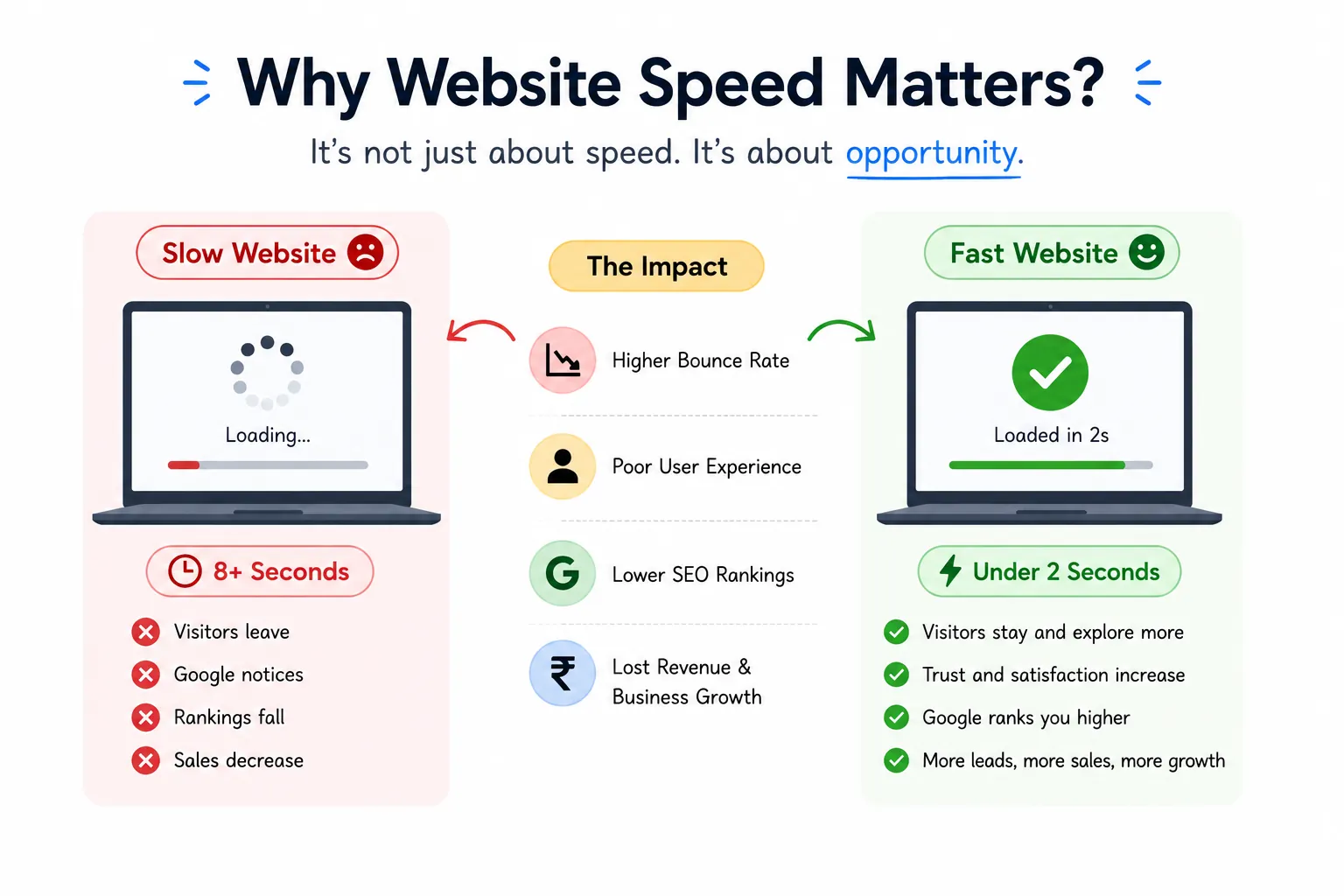
When your site is slow:
❌ Visitors leave
❌ Google notices
❌ Rankings fall
❌ Sales decrease
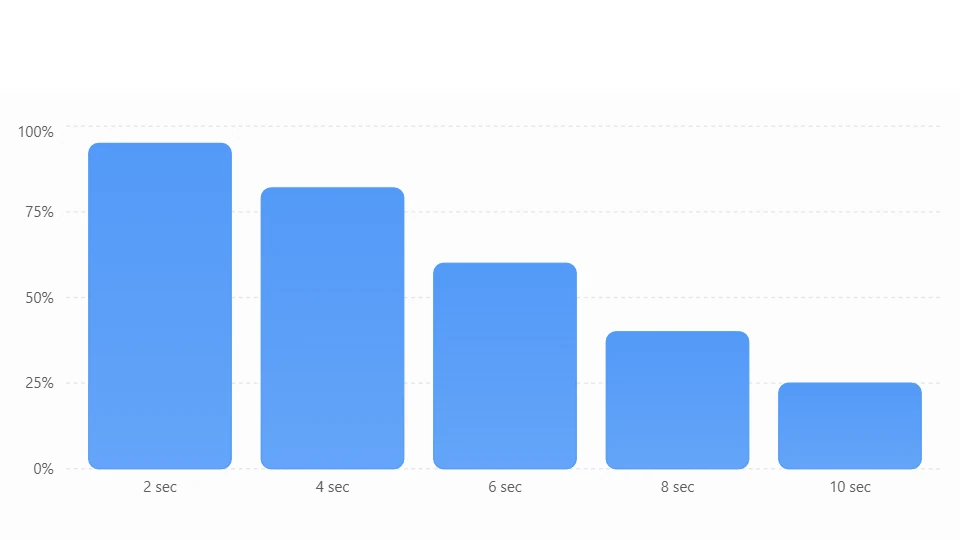
Why Fast Websites Win
Typical impact of page load speed
Illustrative comparison showing how user experience changes as page load time increases.
What is a CDN?
Think of Netflix.
Instead of storing every movie in one country, Netflix keeps copies in many locations worldwide.
So when you watch a movie, it comes from the nearest server—not from across the globe.
A CDN works exactly the same way for websites.
🖥️ Your website is copied to multiple servers worldwide.
🌍 Visitors automatically receive files from the nearest one.
⚡ Result?
Much faster loading times.
How Does a CDN Work?
Step 1
You upload your website to your hosting.
Step 2
The CDN copies your images, CSS, JavaScript and videos.
Step 3
Those files are stored on servers worldwide.
Step 4
Visitors automatically receive files from the nearest location.
Step 5
your website loads significantly faster
CDN vs Normal Hosting
Without CDN ❌ With CDN ✅ Files come from one server Files come from nearest server Slow for international visitors Fast everywhere Higher server load Lower server load Slower SEO performance Better speed signals More downtime risk Better reliability 🚀 Top Benefits of Using a CDN
🚀 Faster Website
- Pages load much faster.
- Visitors don’t have to wait.
- Images and videos open quickly.
🔍 Better SEO
- Faster websites rank better on Google.
- Lower bounce rate improves rankings.
- Better user experience helps SEO.
🔒 Extra Security
- Protects against DDoS attacks.
- Blocks harmful bots.
- Includes Web Application Firewall (WAF).
- Provides free SSL for secure browsing.
🌎 Better Global Performance
- Visitors get the same fast experience from anywhere.
- Delivers content from the nearest server.
- Ideal for international websites.
💰 Reduces Server Load
- CDN handles most static files.
- Your hosting server works less.
- Improves overall website stability.
📈 Better User Experience
- Faster pages keep visitors engaged.
- People stay longer on your website.
- Reduces frustration caused by slow loading.
🛒 Higher Conversions
- Faster websites build trust.
- Visitors are more likely to make a purchase or contact you.
- Better speed can increase sales and leads.
⚡ Improves Website Reliability
- Website stays available even during traffic spikes.
- Reduces the chance of downtime.
- Delivers a smoother browsing experience.
Popular CDN Providers
Provider Best For Cloudflare Beginners Bunny CDN Affordable Amazon CloudFront Enterprise Fastly Large Applications KeyCDN Small Businesses Do You Really Need a CDN?
You should definitely consider one if:
✅ Your website has many images
✅ You run WooCommerce
✅ You get visitors from multiple countries
✅ Your pages load slowly
✅ You care about SEO
Quick Summary
📌 CDN stores copies of your website around the world.
📌 Visitors receive files from the closest server.
📌 Faster websites rank better.
📌 Better speed improves user experience.
📌 Most WordPress websites benefit from using a CDN
Final Thoughts
A Content Delivery Network may sound technical, but its purpose is surprisingly simple: bring your website closer to your visitors.
If you’re building a WordPress blog, a WooCommerce store, or a business website, improving speed is one of the smartest investments you can make. A CDN doesn’t just make your site faster—it helps create a smoother experience for visitors, supports better SEO, and can even improve conversions over time.
As the web becomes more competitive, website speed is no longer a bonus—it’s an expectation.